FOS‑WDP‑S1 — Application Layer Architecture
MBP‑021 — Master Blueprint Package
Fiber‑Optic Smart Wall Display Panel
Master Specifications
| Parameter | Specification |
|---|---|
| System Name | FOS‑WDP‑S1 |
| Type | Rigid, One‑Sided Smart Architectural Display |
| Size (Flagship) | 1200 mm × 2000 mm |
| Display | Fiber‑Optic LED |
| Audio | Dolby Atmos 7.1.4 |
| Touch | 6‑Point Capacitive |
| Power Input | 100–240V AC (50/60Hz) |
| Operating Temperature | 5°C – 40°C |
| Certifications | CE, FCC, RoHS |
Application Layer Overview
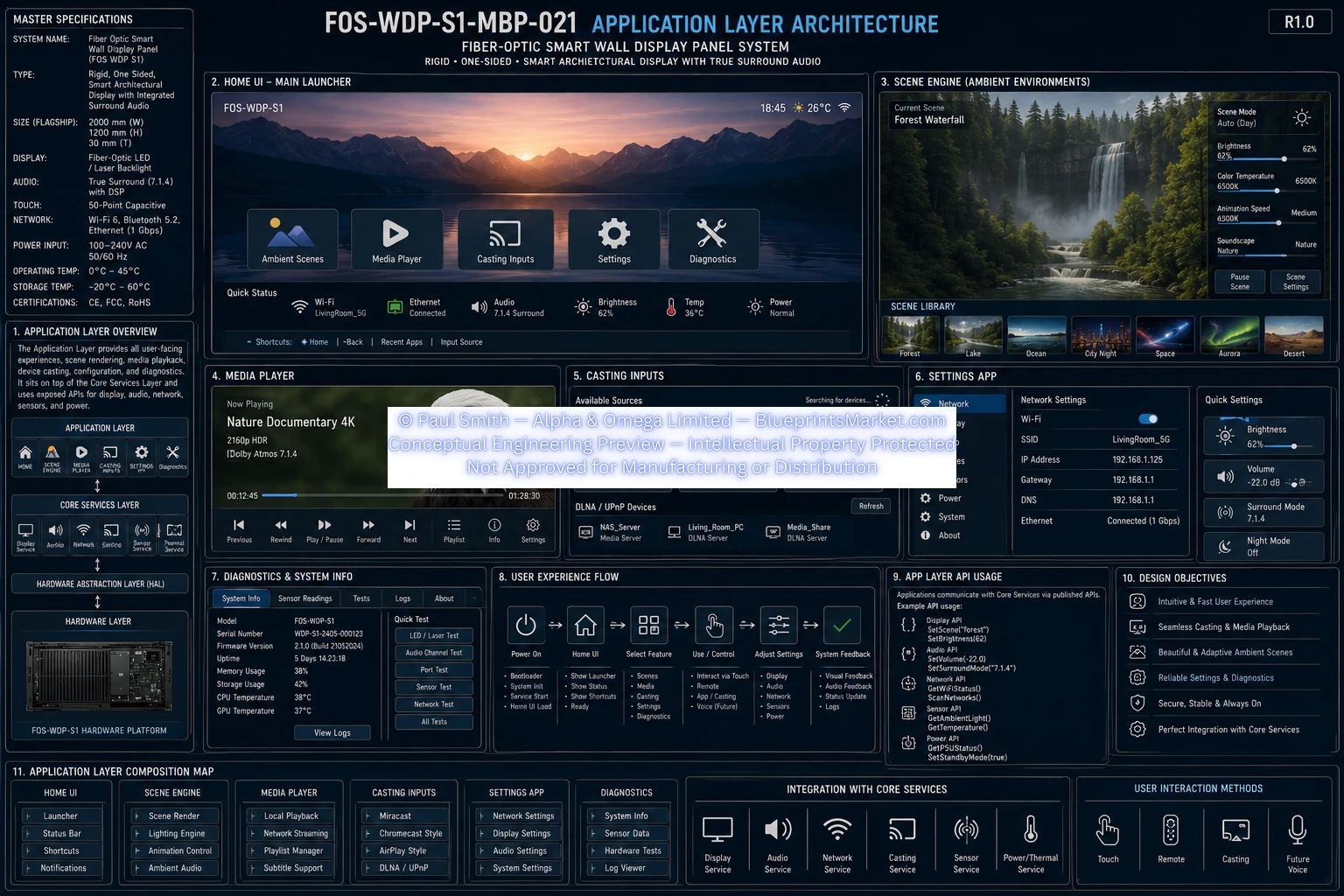
The Application Layer is the top‑level user experience layer of the FOS‑WDP‑S1 system. It provides interactive UI, ambient scene rendering, media playback, wireless casting, system settings, and diagnostics. It interfaces directly with the Core Services Layer and indirectly with the HAL Layer.
- Interactive UI
- Ambient scene rendering
- Media playback
- Wireless casting
- System settings
- Diagnostics & system information
Application Layer Composition Map
- Home UI
- Scene Engine
- Media Player
- Casting Inputs
- Settings App
- Diagnostics
- Core Services Integration
Home UI — Main Launcher
The Home UI provides the primary user interface for system interaction.
Displayed Elements
- Ambient Scenes
- Media Player
- Casting Inputs
- Diagnostics
System Status Indicators
- Wi‑Fi
- Audio
- Brightness
- Temperature
- Power
Scene Engine (Ambient Environments)
Current Scene Example
Forest Waterfall
Adjustable Parameters
- Brightness
- Color Temperature
- Soundscape
Scene Library
- Forest
- Lake
- Ocean
- City Night
- Space
- Aurora
- Desert
Media Player
Example Media
Nature Documentary — 4K 2160p HDR | Dolby Atmos 7.1.4
Features
- Play / Pause / Seek
- Metadata display
- HDR support
- Surround audio support
- Local + streaming playback
Casting Inputs
Supported Casting Protocols
- Miracast
- Chromecast‑style
- AirPlay‑style
- DLNA / UPnP devices
Casting Features
- Wireless display
- Audio casting
- Real‑time latency optimization
Settings App
Network Settings
- Wi‑Fi SSID: LivingRoom_5G
- IP Address: 192.168.1.25
- DNS: 192.168.1.1
- Ethernet: Connected @ 1 Gbps
Quick Settings
- Brightness
- Volume
- Surround Mode
- Night Mode
Diagnostics & System Info
Displayed Information
- Model: FOS‑WDP‑S1
- Firmware Version
- Storage Temperature
- Sensor Readings
- System Health Indicators
Diagnostics Integrates With
- Sensor Service
- Power/Thermal Service
- Network Service
- Audio Service
User Experience Flow
- Power On
- Home UI Launch
- Scene Selection
- Media Playback / Casting
- System Feedback & Status
The flow is designed for intuitive navigation, fast response, seamless transitions, and minimal latency.
Design Objectives
- Intuitive and fast user experience
- Seamless casting and media playback
- Reliable settings and diagnostics
- Secure operation
- High‑performance rendering
- Consistent UI behavior
Architecture Layer Stack
- Application Layer
- → Core Services Layer
- → Hardware Abstraction Layer (HAL)
- → Device Drivers
- → Hardware Platform
Document Information
| Field | Value |
|---|---|
| Document ID | FOSWDPS1MBP021 |
| Revision | R1.0 |
| Title | Application Layer Architecture |
| Tagline | Building Smarter Spaces |
Blueprint Access & Licensing
MBP‑021 — Application Layer Architecture is part of the complete multi‑volume engineering blueprint package for the FOS‑WDP‑S1 Fiber‑Optic Smart Wall Display Panel.
Contact Blueprints Market for licensing, integration support or enterprise‑level deployment.